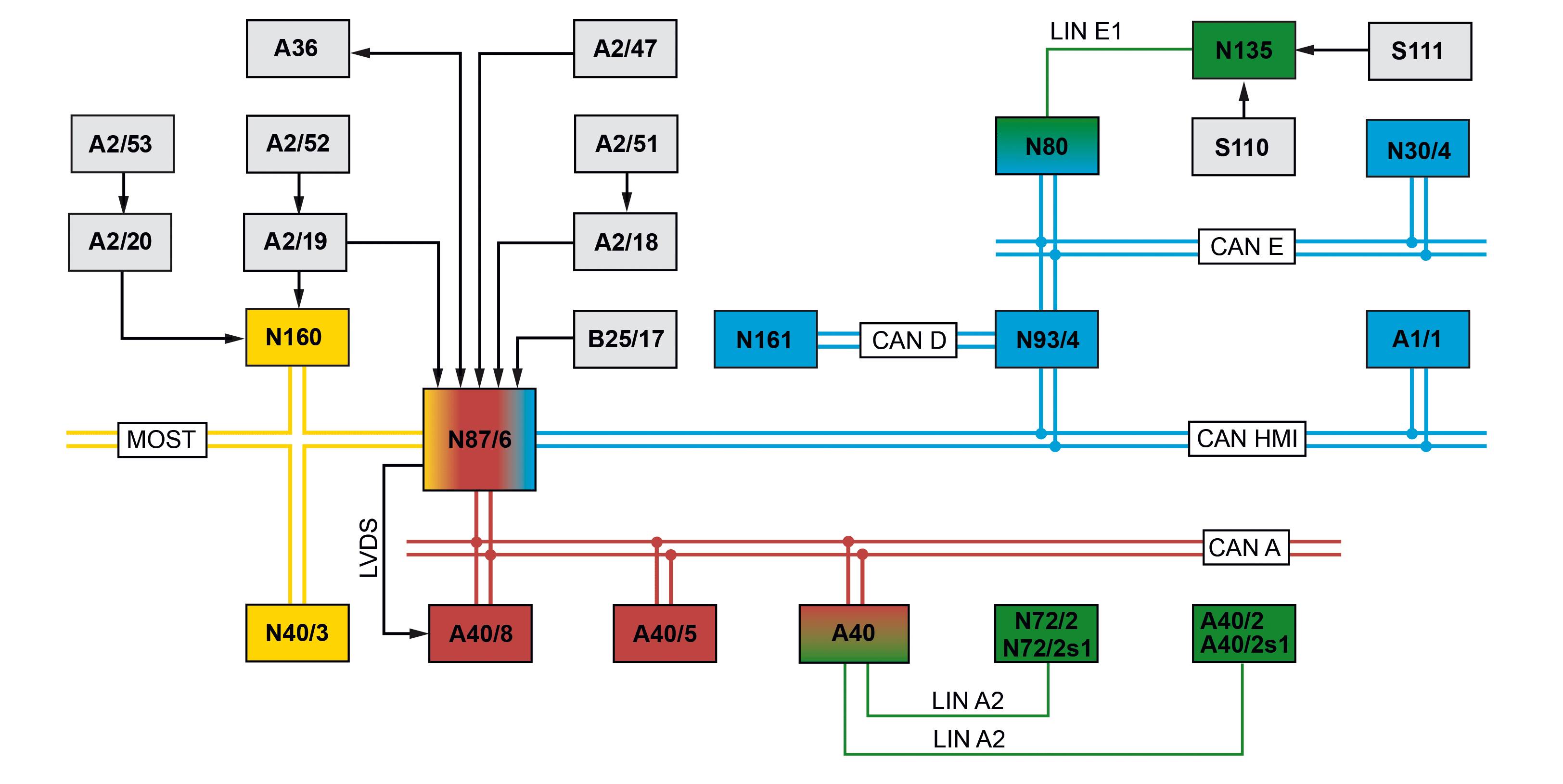
S82.85-4530-79
Illustration shows MODEL 447.8 |
A1/1 | Instrument cluster (KI) control unit | A40/5 | Touchpad control unit | N161 | Communications module control unit (with CODE J49 (COM module)) | ||
A2/18 | FM/AM antenna amplifier | A40/8 | Audio/COMAND display control unit | S110 | Left multifunction steering wheel button group | ||
A2/19 | FM 2/DAB antenna amplifier | B25/17 | Hands-free system microphone | S111 | Right multifunction steering wheel button group | ||
A2/20 | TV and DAB antenna amplifier (with CODE E1D (Digital radio)) | N30/4 | Electronic Stability Program (ESP) control unit | CAN A | Telematics CAN | ||
A2/47 | GPS antenna | N40/3 | Sound system amplifier control unit (with CODE (E65) Burmester surround sound system) | CAN D | Diagnostic CAN | ||
A2/51 | FM/AM antenna | N72/2 | Upper control panel (UCP [OBF]) control unit | CAN E | Chassis CAN | ||
A2/52 | FM antenna | N72/2s1 | "NAVI" button | CAN HMI | User interface CAN | ||
A2/53 | Antenna for DAB2 Band III (with CODE E1D (Digital radio)) | N80 | Steering column tube module (MRM) control unit | MOST | Media Oriented System Transport | ||
A36 | Multimedia connection unit | N87/6 | Radio (Audio/COMAND) | LIN A2 | Telephone keypad LIN | ||
A40 | Central operating unit (COU [ZBE]) control unit | N93/4 | Gateway for user interface CAN | LIN E1 | Steering LIN | ||
A40/2 | Right lower control panel (LCPR [UBFR]) control unit | N135 | Steering wheel electronics | LVDS | Low voltage differential signal | ||
A40/2s1 | Volume control button | N160 | Digital Audio Broadcasting (DAB) control unit (with CODE E1D (Digital radio)) |
Function requirements for navigation mode in general
Status circuit 30g ON
Transport mode not active
General navigation mode
The navigation module is integrated in the radio (Audio/COMAND). The navigation system includes the following functionalities:
Position finding
Destination entry
Route calculation
Display of navigation maps
Intersection zoom
Visual driving instructions in form of pictograms
Acoustic driving instructions
The location and direction of movement of the vehicle are continuously determined with the aid of the navigation system. After entering or selecting a destination location, route calculation starts. A range of options can be selected for route calculation according to the national version, e.g.:
"Fast route"
"Dynamic route"
"Eco Route"
"Short route"
Avoid options (e.g. "Avoid area", "Avoid tunnel", "Avoid ferries", "Avoid toll sticker roads")
If observance of the options is not possible, then the options set are ignored for the sections in question and a message is displayed and signaled audibly. The set options can be displayed and changed at any time. Once calculated, the route is displayed using arrow pictograms on the Audio/COMAND display and this information is also issued as an acoustic notification: "The route is being calculated". If the vehicle deviates from the route, the new route is re-calculated. If the recalculated values are plausible for the navigation system, then the modified route is displayed.
Dynamic route guidance (with "Dynamic route", "Dynamic route with confirmation" or "Eco route" ): An alternative route is offered under dynamic route guidance, in the event of a sufficiently long traffic jam or road closure on the calculated route.
The navigation system also has lists and card data for points of interest (e.g. restaurants, filling stations, parking lots, shopping centers), which can be selected as the destination or for a stopover.
Routes or destinations can be sent from the Internet via the Mercedes-Benz Application Gateway to the vehicle and imported into the navigation system. Compare also document "Internet connection function".
The navigation system can be activated using the "NAVI" button on the upper control panel (UCP) control unit. The upper control panel (UCP) control unit forwards the control signals to the radio (Audio/COMAND) via the following route:
Telephone keypad LIN
Central operating unit (COU [ZBE]) control unit
Telematics CAN
The navigation system can be operated using the central operating unit (COU) control unit. The control signals are sent from the central operating unit (COU [ZBE]) control unit over the telematics CAN to the radio (Audio/COMAND).
The navigation system can be operated with the touchpad control unit. The control signals are sent from the touchpad control unit over the telematics CAN to the radio (Audio/COMAND).
The navigation system can be operated using the voice control system integrated in the radio (Audio/COMAND). The voice input is picked up by the hands-free system microphone, converted into an electrical signal and forwarded via a direct line to the radio (Audio/COMAND).
Additional name lists are provided in the voice control system to facilitate operation of the navigation system (especially destination entry), e.g. name lists for the following information: place names for selected towns/cities on the data medium, street names for all towns, town centers and points of interest (POIs).
The navigation system can be operated with the controls of the left multifunction steering wheel button group and the right multifunction steering wheel button group. The control signals of the left multifunction steering wheel button group and the right multifunction steering wheel button group are forwarded to the radio (Audio/COMAND) via the following route:
Steering wheel electronics
Steering LIN
Steering column tube module (MRM) control unit
Chassis CAN
Gateway for user interface CAN
User interface CAN
Instrument cluster (KI) control unit
User interface CAN
The navigation function consists of the following subfunctions:
General GPS position finding (global positioning system)
GPS position finding function sequence
General information on basic position finding
Basic position finding function sequence
Calibration
Recalibration
General information on route calculation
Route guidance function sequence
General information on dynamic route guidance
Function sequence for dynamic route guidance (except CODE J49 (COM module) and valid subscription for real-time traffic data)
Function sequence for dynamic route guidance with real-time traffic data via the telematics services communications module (with CODE J49 (COM module))
Map function
Extended navigation functions
The navigation system uses a special interface to provide data that is used by other systems in the vehicle. The radio (Audio/COMAND) sends the data via the user interface CAN.
General GPS position finding (global positioning system)
The GPS is a satellite-based position finding system, which is available on a global basis. GPS position finding is irretrievable after vehicle transport (e.g. by train or ferry or after towing). Recalculating the GPS position (after satellite reception has been interrupted) can take several minutes (up to 5 minutes during initial commissioning). The accuracy of the position finding and the actual calculation are essentially based on the measurement of the run times of the signals sent synchronously by the various satellites. A vital precondition is the synchronicity of the clocks in the satellites and in the receiver. To ensure synchronicity, the receiver is equipped with an automatic time correction that is possible thanks to the satellite signals.
Additional function requirements for GPS position finding
Signals available from at least three GPS satellites.
GPS position finding function sequence
The GPS receiver in the radio (Audio/COMAND) receives the GPS signals from the GPS antenna. The radio (Audio/COMAND) uses the GPS signals to calculate the current position of the vehicle. The direction of travel is determined with the aid of the sequence of locations calculated with the GPS system.
As GPS operates in the gigahertz (GHz) range and the signals are weak, the following events may lead to reception interference: atmospheric interference (e.g. bad weather, water vapor, fog), multipath reception due to reflection of the signals (e.g. against building walls) or signal shadowing (e.g. in built-up areas, in tunnels, due to tall buildings or trees).
General information on basic position finding
Navigation can be continued without a GPS signal using basic position finding. A defect, e.g. in the GPS antenna is therefore not immediately perceptible.
Basic position finding runs parallel to GPS position finding. For basic position finding, the radio (Audio/COMAND) requires the following information:
Wheel speed and wheel rotation direction (forwards or backwards)
Gyro sensor (rotational angular velocity)
3-D acceleration sensor (ramp detection)
Basic position finding function sequence
For basic position finding, the radio (Audio/COMAND) requires signals from the following components:
Electronic Stability Program (ESP) control unit (wheel speed signals including direction of travel)
Gyro sensor (turn rate sensor), integrated in the radio (Audio/COMAND)
3D acceleration sensor, integrated in the radio (Audio/COMAND)
The radio (Audio/COMAND) receives the data from the Electronic Stability Program (ESP) control unit via the following route:
Chassis CAN
Gateway for user interface CAN
User interface CAN
The data from the sensors integrated in the radio (Audio/COMAND) is forwarded inside the radio (Audio/COMAND). The current vehicle position (longitude and latitude) is then calculated in the radio (Audio/COMAND). The basic position finding calculation is performed approx. once per second.
Position finding errors in position finding, rolling backwards with "circuit 15 OFF" (ignition switched off) or transport of the vehicle falsify the basic position finding. The deviation is automatically corrected by the navigation processor integrated in the radio (Audio/COMAND) when GPS data is received.
Calibration
The calibration following a tire replacement is performed automatically.
Recalibration
Because of the tire abrasion, a constant recalibration of the tire circumference is required. Recalibration is performed automatically. Recalibration of the tire circumference uses the difference between the calculated and actually traveled distance between two turning points determined with the aid of map-based position finding.
General information on route calculation
Route calculation is accomplished using the options set to the best possible extent. If observance of the options is not possible, then the options set are ignored for the sections in question and a message is displayed and signaled audibly. The set criteria and options can be displayed and changed at any time. Acoustic information is output ("Route is being calculated") and following successful calculation the route is displayed on the map.
Route guidance function sequence
The integrated navigation processor continuously compares the route calculation data with the position finding data and uses the data to deduce measures for further route guidance. The route guidance is carried out by outputting visual and acoustic information and is divided up into the following areas:
Map route guidance
Route guidance through driving lane recommendations
Route guidance by means of voice output
Map route guidance
Signals for visual depiction of the route guidance (map navigation) are generated by the radio (Audio/COMAND) and sent to the Audio/COMAND display control unit via an LVDS line. The Audio/COMAND display control unit is switched on by the radio (Audio/COMAND) via the telematics CAN.
Route guidance through driving lane recommendations
For certain turnoff situations on multiple-land exit points (e.g. freeway intersection) driving lane recommendations are shown in the bottom line. In addition, when a turnoff recommendation is given, the distance to the actual turnoff point is also displayed by means of a bar graph. The lanes have arrows assigned to them, which indicate on which lane the destination can be reached or the best way to reach it.
The following colors are used in the Audio/COMAND display control unit:
White: Denotes the best or recommended lane.
Light gray: the lane is correct, but a lane change will soon be required.
Dark gray: this lane will not take you to the destination.
The instrument cluster (IC) control unit only displays the white arrows.
Route guidance by means of voice output
Route guidance by means of voice output is an assistance function that assists the driver without distracting him from the traffic. Voice is output with the selected system language. The route guidance of the navigation system is supported by voice outputs with the following information:
Directional instructions
Name of the next road to turn into
Additional voice messages are output e.g. at the start of the route calculation, when an intermediate destination is reached or when the destination is reached.
During dynamic route guidance, additional voice messages are issued due to traffic messages affecting the route. Special information is issued in some instances by voice output, for example:
Destination lies in area where driving is only possible to a limited extent
Route via ferry
During voice output, the navigation processor of the radio (Audio/COMAND) links word segments to form complete instructions or information.
On vehicles except CODE E65 (Burmester surround sound system), the voice output is forwarded by the radio (Audio/COMAND) to the speaker system.
On vehicles with CODE E65 (Burmester surround sound system) the radio (Audio/COMAND) sends the voice output over MOST to the sound system amplifier control unit. The sound system amplifier control unit amplifies the signals and forwards them to the speaker system.
More detailed information on the speaker system is available in the "Speaker output function" document.
The volume of the voice output can be adjusted during voice output using the volume control button in the right lower control panel (LCPR) control unit. The radio (Audio/COMAND) receives the control signal from the right lower control panel (UBFR) control unit via the following route:
Telephone keypad LIN
Central operating unit (COU [ZBE]) control unit
Telematics CAN
When voice output is active, the volume of the announcements can be adjusted e.g. also using the right multifunction steering wheel button group.
General information on dynamic route guidance
Dynamic route guidance is performed in "Dynamic route", "Dynamic route with confirmation" or "Eco route" mode. During dynamic route guidance the current traffic situation is taken into consideration when appropriate traffic data is received. The traffic data recorder decodes the traffic information and forwards it internally to the navigation processor upon request. The navigation processor makes the decision whether the route should be changed.
During dynamic routing with confirmation, the user is notified of the effects of the route change on the travel distance and driving time. The route is only changed with the user's agreement.
If necessary, a message that the route should be changed is output via the speaker system.
Function sequence for dynamic route guidance (except CODE J49 (COM module) and valid subscription for real-time traffic data)
The incoming information on the traffic situation can be received by the Radio Data System/Traffic Message Channel (RDS/TMC) function via FM radio if an appropriate station is being received.
The FM receiver in the radio (Audio/COMAND) receives the traffic messages via FM 1 via the following route and forwards them to the traffic data recorder in the radio (Audio/COMAND):
FM/AM antenna
FM/AM antenna amplifier
The FM receiver in the radio (Audio/COMAND) receives the traffic messages via FM 2 in the following way and forwards them to the traffic data recorder in the radio (Audio/COMAND):
FM antenna
FM 2/DAB antenna amplifier
On vehicles with CODE E1D (Digital radio), the incoming information about the traffic situation can be received by the Radio Data System/Traffic Message Channel (RDS/TMC) function via digital radio (DAB) if an appropriate station has been selected. The Digital Audio Broadcasting (DAB) control unit receives the DAB signals via the following route:
FM antenna (DAB 1) and DAB2 Band III antenna (DAB 2)
FM 2, DAB antenna amplifier (DAB 1) and TV and DAB antenna amplifier (DAB 2)
The Digital Audio Broadcasting (DAB) control unit forwards the signals via MOST to the radio (Audio/COMAND).
Additional function requirements for dynamic route guidance with real-time traffic data via the telematics services communications module (with CODE J49 (COM module))
Subscription for real-time traffic data
Model 447.8
with code EA2 (COMAND Online with 6-disc DVD changer)
with code J49 (COM module)
except code XM0 (Facelift)
Model 447.8
with code EJ9 (COMAND Online)
with code J49 (COM module)
except code XM0 (Facelift)
Model 448.8
with code EA2 (COMAND Online with 6-disc DVD changer)
When the subscription has expired, only dynamic route guidance with TMC messages via RDS is available.
Function sequence for dynamic route guidance with real-time traffic data via the telematics services communications module (with CODE J49 (COM module))
The communications module control unit receives the real-time traffic data via the integrated communications interface and forwards this data via a USB connection (Universal Serial Bus) to the radio (Audio/COMAND) where it can be used by the integrated navigation processor.
The communications module control unit receives cyclic position data from the radio (Audio/COMAND) via the USB line. The communications module control unit sends the position data via the integrated communications interface to the service provider. In this way, the communications module control unit contributes to collating the traffic information from which the dynamic route guidance then benefits again.
Map function
Map display is always controlled by the radio (Audio/COMAND). The following display functions are supported:
Route guidance map
Positioning map
Route map
Scrollable map
Destination entry map
Extended navigation functions
The navigation system is extended with regard to convenience, customization and tourist information by the following functions:
Integration of electronic travel guides, accumulation of destinations and downloading routes via an SD card (Secure Digital) and the SD card reader of the multimedia connection unit
Special search engine that also makes fuzzy destination entries possible (e.g. parts of destination town, road or special destinations)
"Route flight" (provides a visual overview of the planned route from a bird's eye view)
"Drive Show" (sequence of pictures, which show the current position, route, traffic information along the route, vicinity of the destination and the altitude course of the route currently being navigated)
"Compass" (display of a compass screen, which also contains the geo-coordinates for the current position and the current altitude)
Possibility to access the Mercedes-Benz "Travel guide" (accessory) via the SD card reader in the multimedia connection unit
Data exchange between the radio (Audio/COMAND) and the SD card takes place via the USB connection between the radio (Audio/COMAND) and the multimedia connection unit.
The extended navigation functions are implemented internally in the radio (Audio/COMAND), and - where applicable - shown via the LVDS line on the Audio/COMAND display.
Referenced documents
- gf8285s9999trb Overview of system components, telematics