D68.30-2498-09
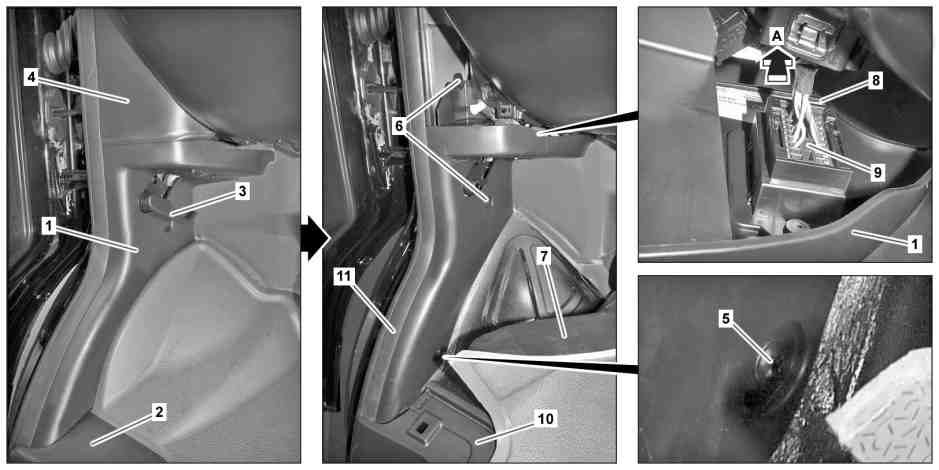
1 | Lower A-pillar trim | 7 | Floor covering | |
2 | Door sill | 8 | Locking element | |
3 | Engine hood cable handle | 9 | Diagnostic connector | |
4 | Cover | 10 | Entrance paneling | |
5 | Screw | 11 | Frame seal | |
6 | Expansion rivet |
Topical note | Notes on carrying out repair work in the vehicle interior | ||
| Remove/install | ||
1 | Remove door sill molding (2) | ||
2 | Unclip engine hood cable handle (3) using a suitable screwdriver, and remove | ||
3 | Remove cover (4) | ||
4 | Fold back floor covering (7) and unscrew screw/bolt (5) | ||
5 | Remove expansion rivets (6) | ||
6 | Slide on locking element (8) in direction of arrow (arrow A) and pull the diagnostic connector (9) upwards out of the A-pillar trim at the bottom (1) | ||
7 | Lift door sill trim (10) in the front area slightly and remove A-pillar trim at bottom (1) | Installation: Ensure that sealing frame (11) is seated correctly. | |
8 | Remove bracket of diagnostic connector (9) | When replacing A-pillar trim at bottom (1). | |
9 | Install in the reverse order |
Referenced documents
- ah6800n000101s Notes on carrying out repair work in the vehicle interior
- ar6830d1306ts Remove/install entrance paneling
- ar8310d4719ts Remove/install defroster vents for side window