
D82.95-0001-09
1 | Camera lens | 5 | Felt tape | 9 | Adhesive strips | ||
2 | Long wedge | 6 | Electrical line | 10 | Emergency call system additional battery | ||
3 | Cable tie | 7 | Screen print | B84/11 | ERA-Glonass control unit | ||
4 | Cable tie | 8 | Headliner |
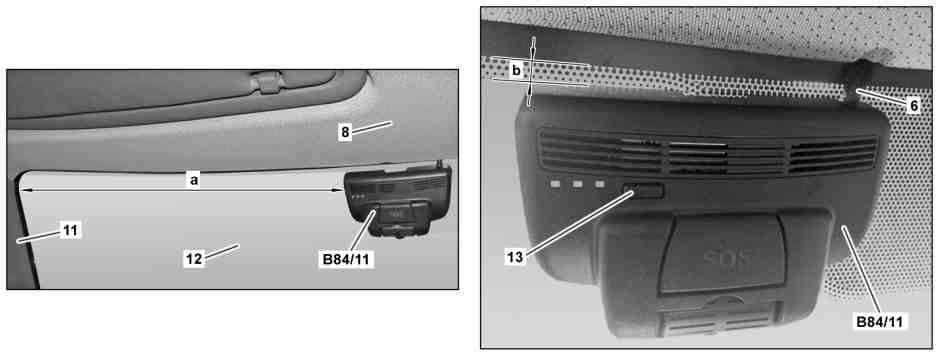
D82.95-0019-08
6 | Electrical line | 13 | Pushbutton | |
8 | Headliner | B84/11 | ERA-Glonass control unit | |
11 | A-pillar trim panel | a | 590 mm | |
12 | Windshield | b | 10 mm |
| Information on preventing damage to electronic components due to electrostatic discharge | ||
| Notes on carrying out repair work in the vehicle interior | ||
| Remove | ||
1 | Switch off ignition and remove ignition key | ||
2 | Adjust camera lens (1) | | |
3 | Remove interior lamp | ||
4 | Mark installation position of ERA-Glonass control unit (B84/11) on windshield (12) | If the ERA-Glonass control unit (B84/11) is replaced and if the windshield (12) is not replaced. | |
5 | Insert long wedge (2) between ERA-Glonass control unit (B84/11) and windshield (12) and carefully pry off ERA-Glonass control unit (B84/11) | Long wedge | |
6 | Remove cable ties (3, 4) | ||
7 | Remove felt tape (5) | ||
8 | Disconnect electrical connector of emergency call system additional battery (10) | ||
9 | Disconnect electrical connector of ERA-Glonass control unit (B84/11) | ||
10 | Disconnect electrical connector for external speaker | ||
11 | Pull out electrical line (6) | ||
| Install | ||
12 | Copy dimensions (a, b) for position of ERA-Glonass control unit (B84/11) to windshield (12) | If windshield (12) has been replaced. | |
Dimension (a) is measured starting from the top corner of the A-pillar trim (11). | |||
13 | Replace the adhesive strips (9) | If ERA-Glonass control unit (B84/11) is not replaced. | |
14 | Clean windshield (12) in the area of the bonding surface | | |
15 | Detach adhesive label with details of the WLAN network and WLAN key from the electrical line (6) and stick in operator's manual | If ERA-Glonass control unit (B84/11) is replaced. | |
16 | Remove protective foils from adhesive strip (9) | ||
17 | Align ERA-Glonass control unit (B84/11) with the markings on the windshield (12) and stick on by applying gentle pressure | ||
18 | Insert electrical line (6) between windshield (12) and cutout (arrow) of headliner (8) | ||
19 | Connect electrical connector for external speaker | ||
20 | Connect electrical connector of ERA-Glonass control unit (B84/11) | ||
21 | Connect electrical connector of emergency call system additional battery (10) | ||
22 | Fasten electric wiring harness | Ensure that electrical lines are routed correctly. Replace felt tape (5). Replace the cable ties (3, 4). | |
23 | Install interior lamp | ||
24 | Swivel camera lens (1) in direction of travel up to the end stop | ||
25 | Keep button (13) pressed down for approx. 5 s until the orange LED stops flashing, activate WLAN of ERA-Glonass control unit (B84/11) | If ERA-Glonass control unit (B84/11) is replaced. | |
The WLAN of the ERA-Glonass control unit (B84/11) is activated for 3 min. During this time, it is possible to log into the WLAN network of the ERA-Glonass control unit (B84/11). | |||
26 | Compare the details for the WLAN network on the adhesive label against the WLAN network of the ERA-Glonass control unit (B84/11) | If ERA-Glonass control unit (B84/11) is replaced. | |
Log in to compare against the details for the WLAN key on the adhesive label. | |||
27 | Connect diagnostic system and perform initial startup of ERA-Glonass control unit (B84/11) | If ERA-Glonass control unit (B84/11) is replaced. | |
| |||
The WLAN key can be read out here. However, this is only possible if the WLAN network has first been activated once. | |||
| Check | ||
28 | Check whether the WLAN key has been entered in the "Actual values" diagnosis menu item and matches the details on the adhesive label | If ERA-Glonass control unit (B84/11) is replaced. |

115 589 03 59 00
Long wedge
Powiązane dokumenty
- ad0000d200004f
- ah5400p000101a Wskazówki dotyczące zapobiegania uszkodzeniom elementów elektronicznych na skutek rozładowania potencjału elektrostatycznego
- ah6800n000101s Wskazówki dotyczące wykonywania prac naprawczych we wnętrzu pojazdu