SI82.00-P-0002A | Service Information: Faulty routing of fiber optic cable, as a result misfire and/or disturbing noises in the audio system | 15.10.08 |
MODEL 211
with CODE (523) MB Audio 20 radio
with CODE (525) MB Audio 50 APS radio
with CODE (819) 6-disk CD changer
with CODE (819) CD changer
Operation no. of operation texts or standard texts and flat rates
Category | Op. no. | Operation text | Time | Acc. no. | Code |
P | 547989 | Remove and reattach ground cable to on-board electrical system battery (when separating electrical connectors) | --- | --- | |
P | 827368 | Remove and install audio 50 | --- | --- | |
P | 827507 | Remove and install CD changer | --- | --- | |
P | 681308 | Remove and install cover in interior on left rear entrance, replace according to findings | 002 WU | --- | --- |
P | 547941 | Cable set, from:..... to:..... replace | Time prescribed by foreperson | --- | --- |
During assembly in the plant or after removal/installation of the head unit or the CD changer, the fiber optic cable may be incorrectly routed.
Also in the area of the left rear rocker panel next to the rear bench seat the fiber optic cable may be damaged due to a too small routing radius.
The following error patterns can occur:
- MOST rustle (disturbing noise/scratching audible)
- System does not start up (lines/MB-star in the display)
- Sporadic failures (resets)
The cause is defective routing of the fiber optic cable and/or damage caused as a result.
No enable from the COMAND diagnosis center is required for this repair
Damage code:
54 257 C6
Text in message field:"wiring harness fiber optic cable kinked"
Danger of breaking! Do not kink fiber optic cable and do not route over sharp edges or bend in radii smaller than 25 mm. Tractive forces on inserts may not exceed 65 N
Do not squeeze fiber optic cable, in other words do not compress using clamps or cable ties.
1 | Check routing of fiber optic cable and correct if necessary | If the fiber optic cable is damaged | |
Remove, replace and install fiber optic cable | |||
2 | Remove CD changer | ||
3 | Insert head unit into the installation opening | With one hand through the installation opening of the CD changer, guide the wiring harness together with fiber optic cable (MOST) to the left next to the shaft wall. Route the fiber optic cable with a large radius. It must not be kinked. | |
4 | Install CD changer |
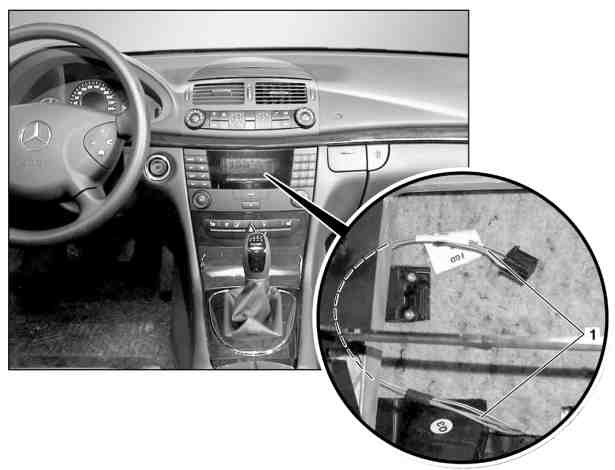
P82.00-2240-06
Routing of fiber optic cable

P82.00-2241-06
Routing of fiber optic cable
Referenced documents
- ar8264p7508t Remove/install CD changer