GF82.60-P-2000TW | Audio functions | 22.5.06 |
MODEL 219.3 with CODE (525) MB Audio 50 APS radio
Radio mode and CD mode
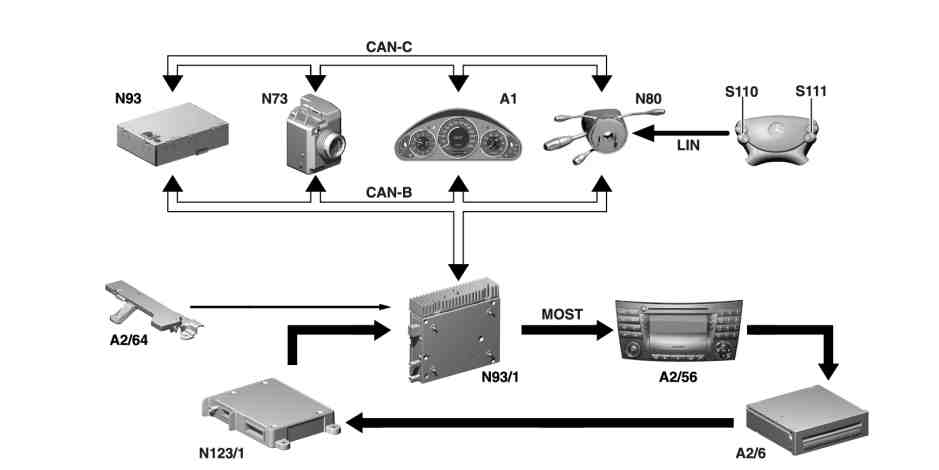
P82.60-4759-09
Schematic representation of radio control panel and navigation unit (A2/56) with code (819) 6-disk CD changer
A1 Instrument cluster
A2/6 CD changer
A2/56 Radio control panel and navigation unit
A2/64 Left antenna amplifier module
S110 Left multifunction steering wheel button group
S111 Right multifunction steering wheel button group
N73 EIS [EZS] control unit
N80 Steering column module
N93 Central gateway control unit
N93/1 Audio gateway control unit
N123/1 Universal Portable CTEL Interface (UPCI [UHI]) control unit
Radio mode, function
The antennas in the rear window receive high frequency (HF) signals for ultra-short wave (FM), short wave (SW), medium wave (MW), and long wave (LW). Modulated onto these HF signals are music, voice, or data signals. The left antenna amplifier module filters the frequencies of the radio frequency bands out of the radio frequency signals received and amplifies them.
-----------------------------------------------------------------------------------------
The amplified signals are then transmitted by the left antenna amplifier module via a coaxial line to the radio tuner integrated in the audio gateway control unit. The radio tuner separates the useful information (audible frequencies) from the carrier signal (inaudible frequencies). The demodulated audio signals are amplified and converted into sound signals by the vehicle speakers.
-----------------------------------------------------------------------------------------
2-receiver technology function
A 2nd (integrated) radio receiver in the audio gateway control unit automatically generates, after the radio control panel and navigation unit is switched on, a list of the FM stations received, which is constantly updated during operation. This list appears, sorted alphabetically, when the "FM station list" menu is called up. The displayed stations can be activated through selection and confirmation.
The station list is only available when the "RDS" function is activated. If problems in the reception occur while driving, the radio control panel and navigation unit tries to receive the selected station on an alternative frequency with the aid of the 2nd receiver and to switch over accordingly in the event of an improvement in reception. There are 10 radio station presets for each frequency band.
-----------------------------------------------------------------------------------------
Station tuning options:
Tuning using station preset
Tuning by program type list
Tuning via frequency list
Tuning by station search
Tuning by station search with the multifunction steering wheel (MFL)
Tuning using auto-store memory
Tuning by search (the stations of a waveband are played for 8 seconds)
Manual tuning
Tuning by manual frequency input (via the control panel of the radio control panel and navigation unit)
Additionally, the following functions shown on the display of the radio control panel and navigation unit are available:
Noise reduction
Radio Data System (RDS), function
-----------------------------------------------------------------------------------------
RDS
In addition to the radio program, many radio stations also transmit non-audible, digital information such as the station name, program type, and traffic information radio channel identification. This information is evaluated by the radio control panel and navigation unit and shown on the display, if the following prerequisites are met:
The RDS function is activated.
A radio station of the RDS is tuned in.
CD player operation, function
Audio CDs can be played back using the radio control panel and navigation unit or using the CD changer. The CD changer has an automatic feed device for 6 CDs. They are loaded centrally via an input slot.
Each CD can be loaded and removed individually with the
6 selection buttons on the unit. The system is operated using the keyboard for data entry at the radio control panel and navigation unit.
-----------------------------------------------------------------------------------------
Only 12-cm CDs may be inserted into the CD changer.
The control signals of the radio control panel and navigation unit as well as the audio data of the CD changer are transmitted via the Media Oriented System Transport (MOST).
The radio control panel and navigation unit processes and amplifies the signals. The CD changer is activated in the "Audio/CD" menu of the radio control panel and navigation unit. After placing an audio CD into the automatically retracting tray of the CD-changer, the following functions are available to the user:
Selection of audio CD
Select track
"Search forwards" and "Search backwards"
Current playback time of track or audio CD
Programming function
-----------------------------------------------------------------------------------------
The following functions are possible:
Track skip
The music tracks are played for 8 seconds. At the end of the audio CD, the CD changer automatically switches to the mode last set.
Random
All the tracks of an audio CD are played back according to the random principle. Once all the tracks have been played once, the next audio CD is automatically loaded and the random function continues. The random function continues until it is deactivated.
Repeat
Alternatively, one track or all tracks of an audio CD are repeated. It is also possible to repeat all tracks of all audio CDs in the magazine.
The following possibilities are available in the menu "Adjustments":
Normal track function
Repeat track
Repeat audio CD
Select a track sequence
Allocate a CD title to an audio CD
Each audio CD receives a permanently stored table of contents. This enables the system, after one-time user allocation of the title, to automatically recognize this CD track, even if the audio CD is inserted into another magazine.
The table of contents additionally contains information regarding the number of titles on an audio CD and the audio CD's total playing time.
Telephone antenna, component description | up to 31.5.06 with code (386) Preinstallation for portable CTEL UPCI [UHI] system with code (388) Universal Portable CTEL Interface System | ||
Rear window antenna component description | up to 31.5.06 | ||
as of 1.6.06 With code (413) Panoramic glass roof with top sliding roof | |||
Multifunction antenna, component description | as of 1.6.06 Except code (413) Panoramic glass roof with top sliding roof | ||
Left antenna amplifier module, component description | |||
Audio gateway control unit, component description | |||
CD player with changer component description | with code (819) CD changer (6 CDs) | ||
Radio/navigation unit, component description | |||
Speaker system, component description |
Referenced documents
- gf8261p4111tx Radio/navigation unit, component description
- gf8262p3119tx Audio gateway control unit, component description
- gf8262p3121txa Left antenna amplifier module, component description
- gf8262p3123tx Rear window antenna component description
- gf8262p3123txa Rear window antenna, component description
- gf8262p3137tx Multifunction antenna, component description
- gf8262p4117txa Telephone antenna component description
- gf8262p4220tx Speaker system, component description
- gf8262p4220txb Speaker system, component description
- gf8262p4220txu Speaker system, component description
- gf8264p3112tx CD player with changer component description
- gf8264p3112txa CD player with changer component description