Repair materials
Number | Designation | Order number |
BR00.45-Z-1071-02A | Adhesive tape roll, gray Tesa tape, 50 meters 0.3X50, 236 mm | A 001 989 17 85 |
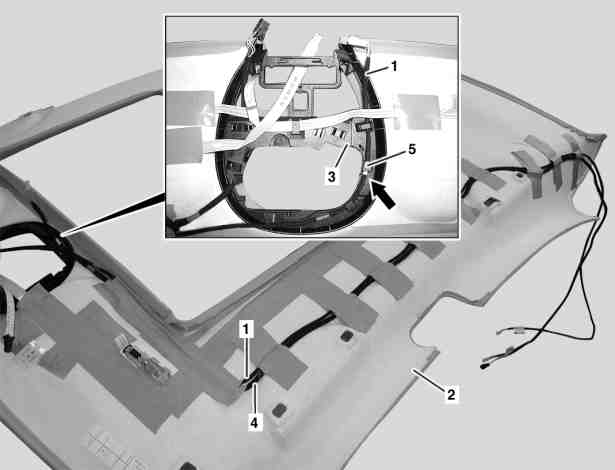
P68.30-3073-06
Shown with code (414) Electric glass tilting/sliding roof
1 Route microphone wiring harness for sound system (1) starting at overhead control panel retaining frame (3).
The microphone wiring harness for sound system (1) thereby makes direct contact to the overhead control panel wiring harness (4) over the entire length.
The microphone wiring harness for sound system (1) has a white marking (arrow)This marking (arrow) must be located on the retainer tab (5) on the overhead control panel retaining frame (3) as illustrated
2 Fasten microphone wiring harness for sound system (1) to headliner (2) with strips of adhesive tape, approx. 10 cm long
The strips of adhesive tape should have a distance of approx. 12 cm to the left exterior contour of the headliner (2). Otherwise the left windowbag may be restricted.
Press on strips of adhesive tape firmly, otherwise the microphone wiring harness for sound system (1) can detach itself from the headliner (2).
Glue strips of adhesive tape to present strips of adhesive tape on the mount for the overhead control panel wiring harness (4).