P68.30-4101-07
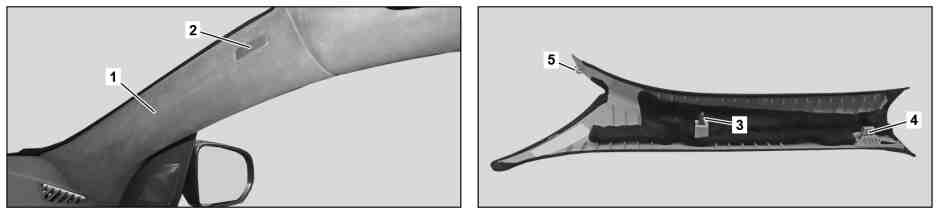
1 | A-pillar paneling | 4 | Mounting clip | |
2 | Cover | 5 | Retaining lug | |
3 | Mounting clip |
Notes on safety-relevant components | |||
| Remove/install | ||
1 | Unclip cover (2). | Long wedge | |
2 | Unclip trim on the A-pillar (1) from the retaining clips (3, 4) and from the retaining clamp (5) and swivel slightly inward at the top. | Installation: Ensure that the edge guard on the trim on the A-pillar (1) is seated correctly. | |
Long wedge | |||
3 | Release retaining lug (5) and pull trim on the A-pillar (1) toward the rear at the top out of the instrument panel and remove. | Long wedge | |
4 | Install in the reverse order. |

115 589 03 59 00
Long wedge
Referenced documents
- ah0000z001901a Notes on safety-relevant components