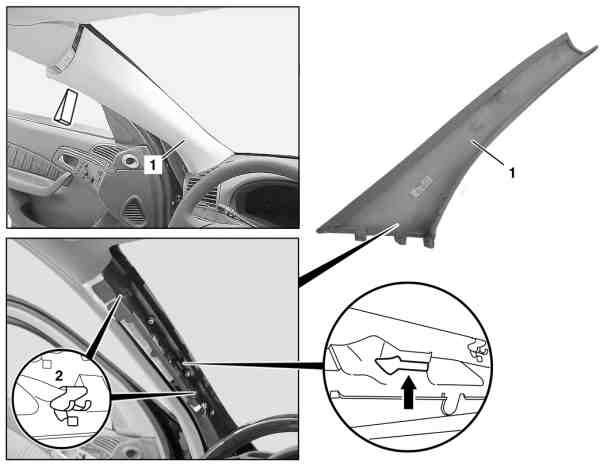
ar6830p4050mc
Remove/install paneling on A-pillar
Type ar · topic 68.30 · version 0103 · 2019-09-19
Applies to: Model 220.175/176/178 with code Z04 (Light armoring) Model 220.175/176/178 with code Z07 (B7 armoring on special protection version)
Where it sits
Function group 3 Body › 68 Interior equipment › 68.30 Coverings, trim — Series 220 (models 175, 176, 178)
EinPAS 37 Interior equipment › 37.45 Trim › 37.45.30 Vehicle interior/passenger compartment trim — Series 220 (models 175, 176, 178)
AR68.30-P-4050MC
| Remove/install paneling on A-pillar
| 19.09.2019
|
Model
| 220.175/176/178
|
|
| with code Z04 (Light armoring)
|
Model
| 220.175/176/178
|
|
| with code Z07 (B7 armoring on special protection version)
|
1
| A-pillar cover
|
2
| Retaining clamp
|
| Remove/install
|
|
|
1
| Remove edge guard in area of A-pillar paneling (1)
|
|
|
2
| Press A-pillar paneling (1) off of retaining clips (2) using assembly wedge
| Mounting wedge
| *110589035900
|
3
| Pull A-pillar paneling (1) upward out of guide (arrow) and instrument panel
|
|
|
4
| Install in the reverse order
|
|
|