D68.30-2419-09
Shown on model 900.633
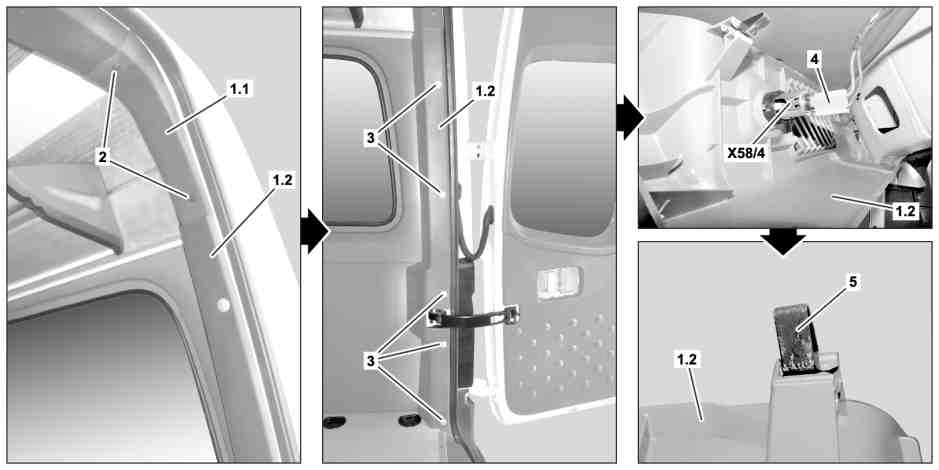
1.1 Upper paneling
(only on model 900.633)
1.2 Lower trim panel
2 Expansion clips (only on model 900.633)
X58/4 Load compartment socket
3 Expansion clips
4 Electrical connector
5 Clamp
| Remove/install | ||
| Notes on carrying out repair work in the vehicle interior | ||
1 | Remove expansion clips (2) | In model 900.633 | |
Clip remover | |||
2 | Remove upper paneling (1.1) | In model 900.633 | |
3 | Remove expansion clips (3) | Clip remover | |
4 | Remove lower paneling (1.2) from rear pillar and pivot to side until electrical connector (4) is accessible | Carefully remove lower paneling (1.2) from rear pillar. Otherwise the mounts on the clips (5) can break and the lower paneling (1.2) must be replaced. | |
Lower paneling (1.2) is fastened to rear pillar with 4 clips (5). | |||
5 | Disconnect electrical connector (4) from cargo area socket (X58/4) and guide out lower paneling (1.2) | ||
6 | Install in the reverse order |

Clip remover
452 589 01 63 00
Referenced documents
- ah6800n000101s Notes on carrying out repair work in the vehicle interior