83-5682.02 Testing, removal and installation of flame monitor
DBW 2012 heater unit |

Testing (in installed condition)
-------------------------------
1 Connect voltmeter to connections D6 (+) and D7 (-) of the control unit.
2 Switch on heater unit. The voltmeter must now display 5 V. After approx. 15 - 20 seconds the voltage must drop to < 1 V.

Removal and installation
-------------------------------
1 Remove burner unit (83-5542).
2 Connect plug connection (1) for flame monitor.
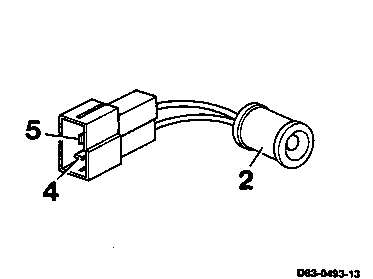
3 Push flame monitor (2) out of the mounting.
Installation note
Ensure that the flame monitor (2) is seated centrally in the inspection window (arrow). If required, press the mounting (3) into the correct position.
Testing (in removed condition)
-------------------------------
1 Connect the flame monitor (2) to 5 V via a series resistor of 1 kW.
(+) = orange cable, plug contact (4)
( - ) = green cable, plug contact (5)
2 Connect a voltmeter parallel to the flame monitor.
3 Darken flame monitor; the voltmeter must now display 5 V.
4 When the flame monitor is illuminated with a naked flame or a bulb (5 W), the voltage must drop to < 1 V.
Note
If the inspection window (arrow) of the protective disk is contaminated, it must be cleaned.
If the heater unit has a lot of faults or a "relay rattling" in the control unit is audible, the cause of the fault may be the flame monitor not being seated centrally in the inspection window.
5 Install parts in the reverse sequence.