
W82.85-1536-11
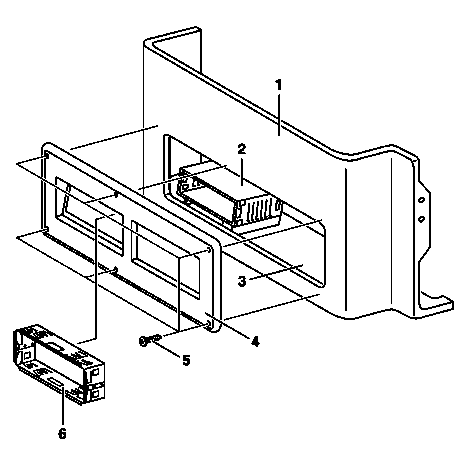
1 Pull off protective foils from adhesive strips (arrows) of assembly frame (2).
2 Make sure that the bonding surfaces in the stowage compartment are free of oil and grease.
W82.88-1174-12
3 Insert assembly frame (2) loosely into stowage compartment (3).
Do not press against assembly frame (2), so it can still be aligned.
4 Place the wiring harness for the FleetBoard with the FleetBoard connector, GPS antenna line and the GSM antenna line into the assembly frame (2).
5 Mount covering (4) onto the stowage compartment (3).
6 Line-up assembly frame (2) and covering (4).
7 Fasten covering (4) onto stowage box (1) using self-tapping screws (5).
8 Align assembly frame (2) to covering (4) and press firmly against stowage compartment (3).
9 Insert installation frame for FleetBoard vehicle computer (6) through the covering (4) into the assembly frame (2).

W82.85-1537-11
10 Connect the FleetBoard vehicle computer wiring harness (9) to the FleetBoard connector (X126).
11 Route GPS antenna line (7), GSM antenna line (8) and wiring harness for FleetBoard vehicle computer (9) out of assembly frame (2).
12 Cut GPS antenna line (7) and GSM antenna line (8) to the length of the wiring harness for the FleetBoard vehicle computer (9) and fasten to the electrical lines using cable ties on either side of FleetBoard connector (X126).

W82.85-1576-11
13 Connect GPS antenna line (7) and GSM antenna line (8) to FleetBoard vehicle computer (10).
Pay attention to color coding.
14 Connect FleetBoard vehicle computer connector (P502) of FleetBoard vehicle computer wiring harness (9) to FleetBoard vehicle computer (10).
The designation of the FleetBoard vehicle computer connector (P502) is found on both the wiring harness for the FleetBoard vehicle computer (9) and the FleetBoard vehicle computer (10).
15 Slide FleetBoard vehicle computer (10) into assembly frame.
Ensure that FleetBoard vehicle computer (10) is correctly latched in assembly frame.