
711 589 01 40 00
Support fixture
For removing intermediate plate (1), the main shaft and countershaft must be inserted into the support fixture (2).

1 | Insert support pillars (33) in the sleeves on the support slides (3). |
The supporting pillars (33) stabilize the position of the intermediate plate (1) and prevent its tilting away to one side when loosening the bolts. |
2 | Slide support slider (3) inwards up to end stop. |
Shown on transmission 711.685 |
D26.40-1147-02

3 | Unscrew screw/bolts (4). |
Shown on transmission 711.685 |
D26.40-1148-01
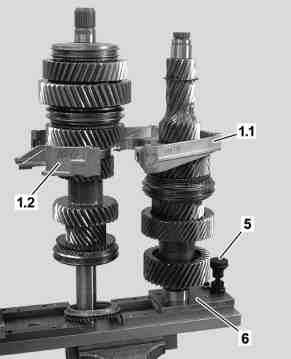
4 | Unlock fastening device (5) at support slider (6) and slide both support sliders (3, 6) outwards up to end stop. |
5 | Remove intermediate plate halves (1.1, 1.2). |
Shown on transmission 711.685 |
D26.40-1149-02

6 | Remove pilot bushing (7). |
Shown on transmission 711.685 |
D26.40-1150-01