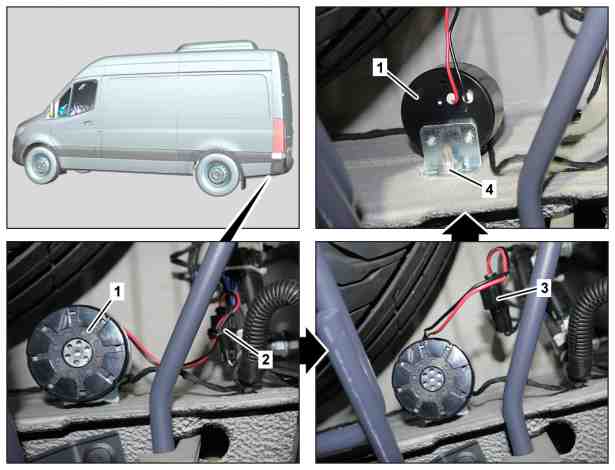
1 | Backup warning system |
2 | Cable tie |
3 | Electrical connector |
4 | Nut |
D82.25-0010-76
Topical note | Notes on self-locking nuts and bolts | ||
| Remove/install | ||
1 | Cut cable tie (2). | Installation: Use a new cable tie (2) for fixing the electrical connector (3) in place. | |
2 | Disconnect electrical connector (3). | ||
3 | Turn reverse warning device (1) until the nut (4) is accessible. | ||
4 | Unbolt nut (4) and remove reverse warning device (1). | ||
5 | Install in the reverse order. | ||
| Check | ||
6 | Perform function test of reverse warning device (1). |
Powiązane dokumenty
- ah0000n000101a Wskazówki dotyczące samozabezpieczających śrub i nakrętek