
P68.30-3339-07
Shown on right side on model 451.3
1 Trunk paneling
2 Cap
5 Insulation mat
6 Clip
3 Cover
4 Screw
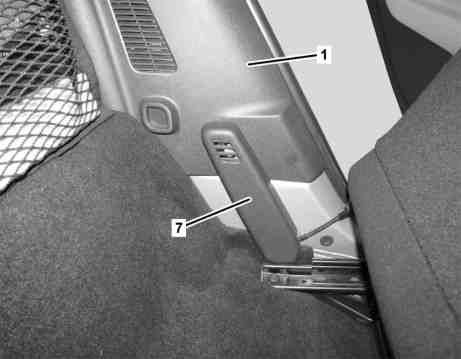
P68.30-3545-11
Driver side, as of 31.8.10
1 Trunk paneling
7 Belt end fitting tensioner cover
| Remove/install | ||
1 | Adjust left and right seat toward front | ||
2 | Unclip belt end fitting tensioner cover (7) | Driver side, as of 31.8.10 | |
3.1 | Unclip cap (2) below right trunk paneling (1) and remove | When removing right trunk paneling (1). | |
3.2 | Unclip cover (3) on left trunk paneling (1) and remove | When removing left trunk paneling (1). | |
4 | Unscrew bolt (4) from trunk paneling (1) | The bolt (4) is located on the right trunk paneling (1) behind the cap (2). | |
5 | Unclip trunk paneling (1) and remove | With code (C17) smart surround sound system, disconnect electrical connector on left rear and right rear speaker. | |
Installation: Check clips (6) on trunk paneling (1), replace if necessary. Position edge guard on lower rear-end door in area of trunk paneling (1) with suitable tool. | |||
6 | Remove insulating mat (5) | When replacing trunk paneling (1). | |
7 | Install in the reverse order |