GF00.20-W-3008A | Delete DTC memory, function | 25.4.96 |
MODELS 375.3,
950.0## /1## /2## /3##, 952.0## /1## /2## /3##, 953.1## /3##, 954.0## /1## /2## ## up to 472725,
950.5## /6##, 952.5## /6##, 953.6##, 954.5## ## up to 587771,
957.### ## up to 931222
with Flexible Service System (FSS)
The DTC memory can only be deleted when in diagnosis mode. The deletion process is dependent on the current diagnosis mode display and can be performed in all display ranges.
Before deleting all fault codes should be called up first and noted down for subsequent troubleshooting. A fault that is still present is entered straight away again after the deletion process.
The deleting process using the display and control elements on the onboard instrument cluster (GI) is show below.
For calling and deleting off-board e.g. using the hand-held tester, the respective operating instructions for each test device used are valid.
The displays are shown in the green display field.

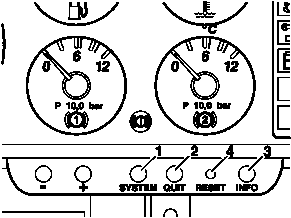
W54.30-0004-01
Models 950.0/1/2/3, 952.0/1/3, 953.1/3, 954.0/1/2/4, 957
Models 375.3, 950.5/6, 952.5/6, 953.6, 954.5
W00.20-1020-01
Deletion process:
Diagnosis mode for the
WS/FSS active
Start deletion process by pressing the "RESET" (4) and
"QUIT" (2) keys.
First, activate the "RESET" key, hold the key down and then
press the "QUIT" key
FSS Reset 2 s display for confirmation
of deletion process
FSS after a successful deletion process the electronic system's designation is displayed again
The system returns to the start of the diagnosis display mode following the deletion process. The WS/FSS diagnosis data can now be called up again, the next electronic system selected, or normal mode may be selected again.
Calling up of the
WS/FSS diagnosis data again by
pressing the
"INFO" (3) key MB part number is displayed again
Selection of next
electronic system
by pressing the
"SYSTEM" (1) key The designation of the next electronic system is displayed with or without fault code
return to normal mode
by pressing the
"QUIT" key No display in green display field