P80.57-2303-09
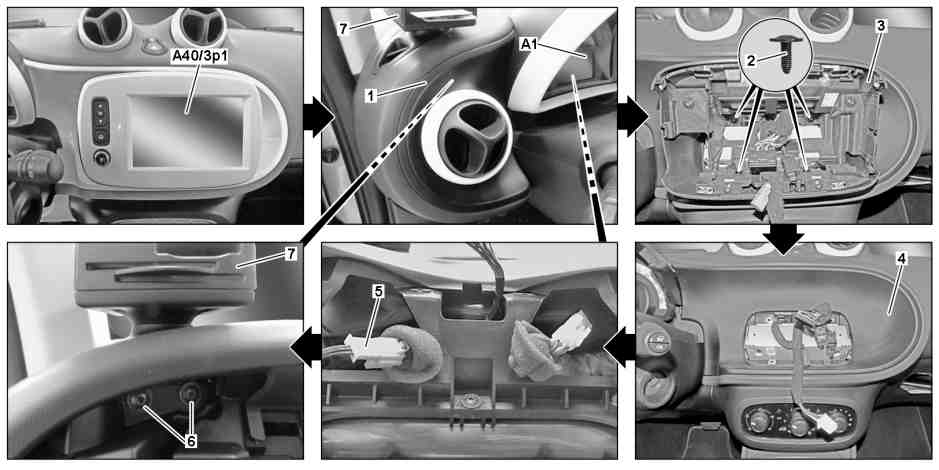
1 | Trim piece with driver side air vent | 6 | Screw | |
2 | Screw | 7 | Card and key insert module | |
3 | Fastening bracket | A1 | Instrument cluster | |
4 | Trim piece | A40/3p1 | Touchscreen | |
5 | Electrical connector |
| Information on preventing damage to electronic components due to electrostatic discharge | ||
| Remove/install | ||
1 | Switch off ignition and remove key from ignition lock | ||
2 | Remove touchscreen (A40/3p1), trim piece with driver side air vent (1) and instrument cluster (A1) | ||
3 | Unscrew bolts (2) and remove mounting console (3) | Installation: Ensure that electrical wiring harnesses are seated correctly. | |
4 | Unclip trim piece (4) and remove | Clip remover | |
5 | Disconnect electrical connection (5) | ||
6 | Remove screw/bolts (6) | ||
7 | Unclip card and key insert module (7) and remove upward | Installation: Ensure that electrical wiring harnesses are seated correctly. | |
Clip remover | |||
8 | Install in the reverse order |

452 589 01 63 00
Clip remover
Referenced documents
- ah5400p000101a Information on preventing damage to electronic components due to electrostatic discharge
- ar5430p6015sr Remove/install instrument cluster