ar6830p4785h

Remove/install rear center section paneling

Type ar · topic 68.30 · version 0102 · 2006-12-12

Applies to: MODEL 240

Where it sits

Function group 3 Body › 68 Interior equipment › 68.30 Coverings, trim — Series 240

EinPAS 37 Interior equipment › 37.45 Trim › 37.45.34 Trunk lining — Series 240

EinPAS 37 Interior equipment › 37.45 Trim › 37.45.35 Load compartment trim — Series 240

AR68.30-P-4785H

Remove/install rear center section paneling

10.7.02

MODEL 240

Remove/install rear center section paneling

P68.30-2594-09

Shown on model 240.078

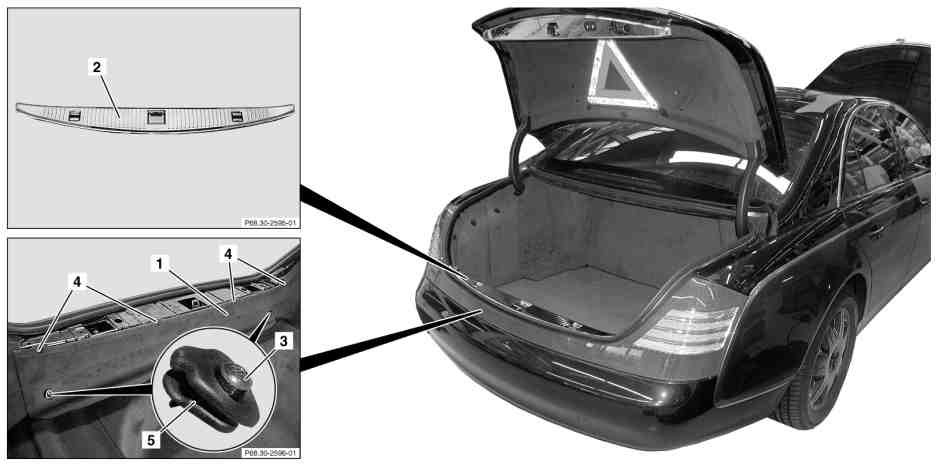
1 Rear center section paneling

2 Chrome molding

3 Bolt

4 Bolt

5 Latching eye

Remove/install

1

Unclip chrome molding (2) on rear center section by forcing upward with assembly wedge

Assembly wedge

*110589035900

2

Unscrew bolts (3) for latching eye (5) and remove latching eye (5)

3

Unscrew bolts (4) and remove rear center section paneling (1) upward

4

Install in the reverse order

Remove/install rear center section paneling

Assembly wedge

110 589 03 59 00