ar2640d033008a

Remove intermediate plate

Type ar · topic 26.40 · version 0103 · 2009-06-17

Applies to: TRANSMISSION 711.660 in MODEL 906.1 /2 /6 /7 with ENGINE 642.992, 646.985 /986 /989 TRANSMISSION 711.670 in MODEL 204 with ENGINE 642, 651 TRANSMISSION 711.670 in MODEL 212 TRANSMISSION 711.670 in MODEL 207 with ENGINE 651

Where it sits

Function group 2 Chassis › 26 Manual transmission › 26.40 Housing — Series 204 · Series 207 · Series 212 · Series 646 (models 985, 986, 989) · Series 651 · Series 906 (models 1**, 2**, 6**, 7**)

EinPAS 17 Drivetrain/axle › 17.20 Transmission › 17.20.30 Housing/cap/oil pan/mounting — Series 204 · Series 207 · Series 212 · Series 646 (models 985, 986, 989) · Series 651 · Series 906 (models 1**, 2**, 6**, 7**)

Also applies to engines/gearboxes: 642 ***, 642 992, 711 660, 711 670

AR26.40-D-0330-08A

Remove intermediate plate

Remove intermediate plate

Support fixture

711 589 01 40 00

Remove intermediate plate

D26.40-1147-02

To remove intermediate plate (1) the main shaft and countershaft must be inserted into the
support fixture (2).

1 Insert support pillars (33) in the sleeves on the support slides (3).

2 Slide support slides (3) inwards as far as the end stop.

The supporting pillars (33) stabilize the position of the intermediate plate (1) and prevent its tilting away to one side when loosening the bolts.

Remove intermediate plate

D26.40-1148-01

3 Remove bolts (4).

Remove intermediate plate

D26.40-1149-02

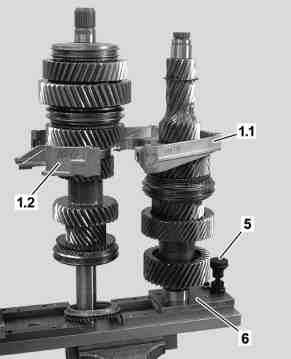
4 Unlock adjuster (5) on the support slide (6) and slide both support slides (3, 6) outwards as far as the end stop.

5 Remove intermediate plate halves (1.1, 1.2).

Remove intermediate plate

D26.40-1150-01

6 Remove centering sleeve (7).